1. 사용법

null이나 undefinded이면 내가 정한 값을 리턴한다.


// null일 때 리턴
let firstName = null;
let username = firstName ?? "Guest";
console.log(username); // "Guest"

// undefined일 때도 마찬가지
let username = undefined ?? "Guest";
console.log(username); // "Guest"


2. undefined나 null 값을 처리할 때 쓰기 좋다.

어떨 때는 props를 쓸 때가 있고, 어떨 때는 안쓸 때가 있다. 그 때 AND 연산자를 쓰면 매번 undefined일 때 return;으로 종료를 시키는 식으로 해야한다. 그렇지만 nullish를 쓰면 그럴 필요가 없다.

(1) undefined일 때

  console.log(example ?? "null이나 undefined면 이거 쓰셈");
  console.log(example || "false면 이거 쓰셈");
  let example;

??을 썼을 때는 스무스하게 처리된다.

근데 || 썼을 때는 undefined여도 truth로 취급돼서 example을 그대로 출력하고 있다.

---

(2) false일 때

  let example = false;

(2-1) 0일 때, ""일 때

두 경우에도 모두 false이다. 

이런 특징 때문에 0이 할당될 수 있는 변수를 사용해 기능을 개발할 땐 || 보다 ??가 적합합니다.
  let example = 0;

----

  let example = "";


참고:

https://sebhastian.com/javascript-double-question-mark/ 

https://ko.javascript.info/nullish-coalescing-operator

p ~ span {
  color: red;
}

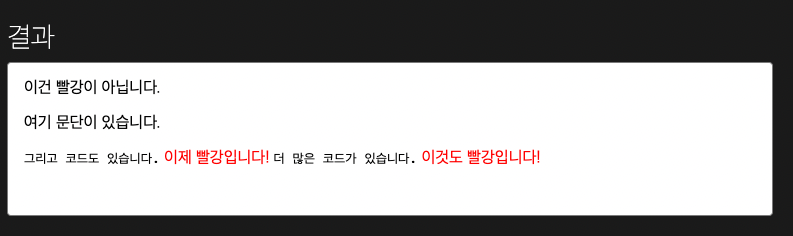
<p>태그 뒤에 있는 <span> 태그들 모두에게 적용된다. 

즉, <p>태그와 형제 관계여야하고, html상 <p> 뒤에 나와야 한다.

<span>이건 빨강이 아닙니다.</span>
<p>여기 문단이 있습니다.</p>
<code>그리고 코드도 있습니다.</code>
<span>이제 빨강입니다!</span>
<code>더 많은 코드가 있습니다.</code>
<span>이것도 빨강입니다!</span>


출처: https://developer.mozilla.org/ko/docs/Web/CSS/General_sibling_combinator


'HTML & CSS' 카테고리의 다른 글

rem VS px  (0) 2022.11.09

px을 썼을 때는 사용자가 브라우저 글씨 크기를 바꾸거나 확대비율을 바꿔도 글꼴이 고정값으로 유지된다.

rem을 쓰면 사용자 설정에 맞춰서 크기가 하게 만들 수 있다.

html {       
	font-size: 62.5%; 
	/* 62.5% of the base size of 16px = 10px.*/
	/* 브라우저의 기본 글씨 크기는 16px이다. 62.5%로 설정하면 기본 설정을 쓰는 유저 기준으로 10px을 기준으로 잡게된다 */
}

body {       
	font-size: 1.6rem; 
	/* reset 10*1.6 = 16px, to make sure you do not get any 10px around */
}

https://uxdesign.cc/why-designers-should-move-from-px-to-rem-and-how-to-do-that-in-figma-c0ea23e07a15

'HTML & CSS' 카테고리의 다른 글

[선택자] ~ 물결 선택자 (일반 형제 결합자)  (0) 2022.11.11

https://themarketer.tistory.com/82

https://nextjs.org/docs/basic-features/script

strategy="beforeInteractive"설정하기

--

load 메서드를 사용하려면 스크립트 태그 마지막에 &autload=false 쓰기

https://mingeesuh.tistory.com/7

--

window에서 kakao객체를 뽑아서 사용하면 됩니다. -> 오류남. 글로벌 객체로 설정하는 방법 필요

https://velog.io/@tpgus758/React%EC%97%90%EC%84%9C-Kakao-map-API-%EC%82%AC%EC%9A%A9%ED%95%98%EA%B8%B0

--

kakao 객체 글로벌객체로 설정하기!

https://art-coding3.tistory.com/58


1. Link로 감싸기  -> 지도를 드래그 했을 시에도 링크가 이동되는 문제가 있다. 클릭이벤트 등록하는 방법이 더 낫다.

import Link from "next/link";
      <Link href={`https://map.kakao.com/link/to/18577297`}>
        <div
          id="map"
          style={{
            width: "500px",
            height: "500px",
          }}
        ></div>
      </Link>

1. 클릭 이벤트 등록

클릭했을 때 지도 링크로 연결시키는 함수를 만든다.

	  // 클릭시 카카오맵 길찾기가 새 탭으로 열립니다.
      kakao.maps.event.addListener(map, "click", () => {
        window.open(`https://map.kakao.com/link/to/18577297`, "_blank");
      });

https://apis.map.kakao.com/web/sample/addMapClickEvent/

2. 링크 설정하기
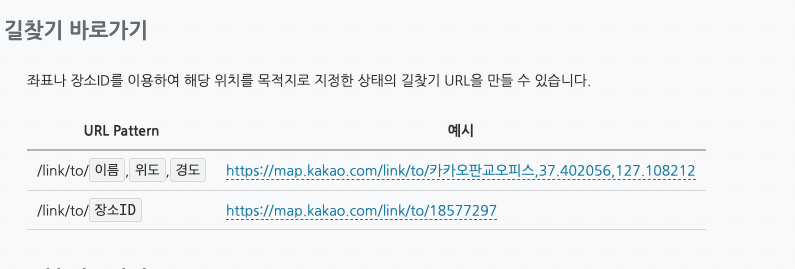
장소 ID를 이용해서 길찾기 바로가기 링크를 만들 수 있다. 서버에서 장소ID만 받아오면 되겠다.

https://apis.map.kakao.com/web/guide/#bigmapurl

'React > Next.js' 카테고리의 다른 글

Next.js에 카카오 맵 API 적용하기 - 정적 이미지 지도  (0) 2022.11.09

정적 이미지 지도에 마커 추가하기

import Script from "next/script";
import { useEffect } from "react";

const KakaoMap = () => {
  /*global kakao*/
  useEffect(() => {
    kakao.maps.load(() => {
      let markers = {
        position: new kakao.maps.LatLng(33.450701, 126.570667),
        text: "텍스트를 표시할 수 있어요!", // text 옵션을 설정하면 마커 위에 텍스트를 함께 표시할 수 있습니다
      };
      let staticMapContainer = document.getElementById("staticMap"), // 이미지 지도를 담을 영역의 DOM 레퍼런스
        staticMapOption = {
          center: new kakao.maps.LatLng(33.450701, 126.570667), // 이미지 지도의 중심좌표
          level: 3, // 이미지 지도의 확대 레벨
          marker: markers,
        };

      const staticMap = new kakao.maps.StaticMap(
        staticMapContainer,
        staticMapOption
      ); //지도 생성 및 객체 리턴
      
    });
  }, []);
  return (
    <>
      <Script
        type="text/javascript"
        src={`//dapi.kakao.com/v2/maps/sdk.js?appkey=${process.env.NEXT_PUBLIC_DEVELOPMENT_KAKAO_MAP_KEY}&autoload=false`}
        // &autoload=false를 설정합니다. 스크립트 로딩이 끝난 뒤에 kakao객체에 접근합니다.
        strategy="beforeInteractive" // 스크립트를 먼저 로드합니다.
      />
      <div
        id="staticMap"
        style={{
          width: "500px",
          height: "500px",
        }}
      ></div>
    </>
  );
};
export default KakaoMap;

---

알아둬야 할 점

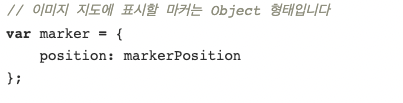
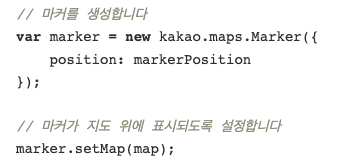
1. 정적 이미지 지도에 그리는 마커는 일반 지도의 마커와 약간 다르다.

- 정적 이미지 지도: 그냥 Object형태로 직접만들고 있다.

- 일반 이미지 지도의 마커: Marker 생성.

2. 정적 이미지 지도에는 마커 이미지 변경이 안된다.

https://devtalk.kakao.com/t/url/124947


http://blog.hwahae.co.kr/all/tech/tech-tech/6946/

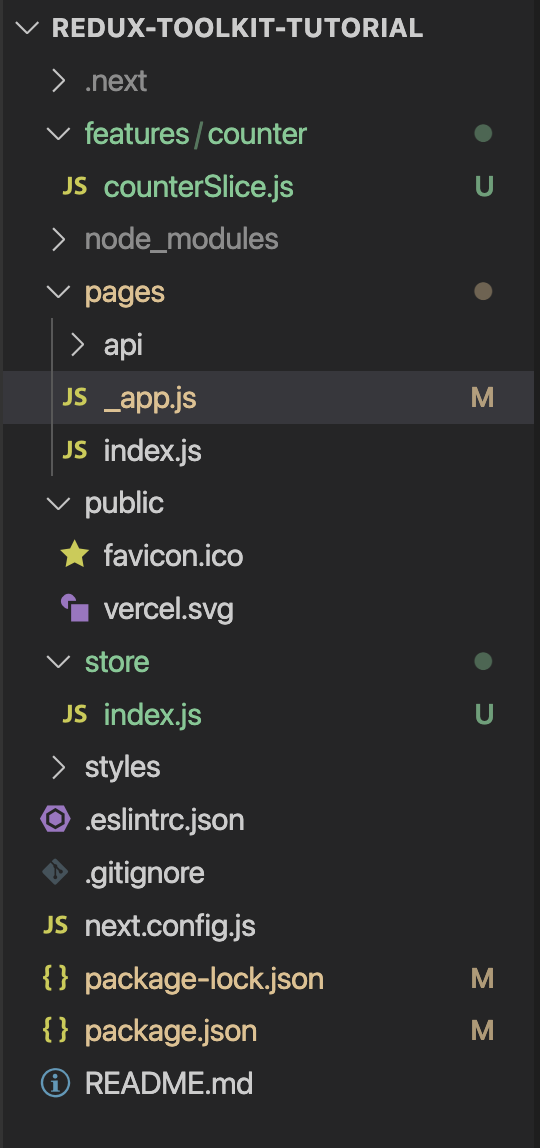
디렉토리를 이렇게 설정해주세요.

0. configureStore로 리덕스 스토어 만들기 (/store/index.js)

import { configureStore } from "@reduxjs/toolkit";
import counterReducer from "../features/counter/counterSlice";
export const store = configureStore({
  reducer: {
    counter: counterReducer,
  },
});

1. redux 스토어 제공하기 (_app.js)

Provider로 감싸줍니다.

import "../styles/globals.css";
import { Provider } from "react-redux";
import { store } from "../store"; // 또는 import { store } from "../store/index.js";

function MyApp({ Component, pageProps }) {
  return (
    <Provider store={store}>
      <Component {...pageProps} />
    </Provider>
  );
}

export default MyApp;

2. createSlice로 slice reducer 만들기

import { createSlice } from "@reduxjs/toolkit";
const initialState = {
  value: 0,
};
export const counterSlice = createSlice({
  name: "counter",
  initialState,
  reducers: {
    increment: (state) => {
      state.value += 1;
    },
    decrement: (state) => {
      state.value -= 1;
    },
  },
});
// Action creators are generated for each case reducer function
export const { increment, decrement } = counterSlice.actions;

export default counterSlice.reducer;
리덕스는 모든 state를 불변하게 업데이트했어야 했습니다. state그 자체를 수정하는게 아니라, 복사본을 만들어서 그 복사본을 업데이트하는 방식이었습니다. 그런데 리덕스툴킷의 createSlice와 createReducer API는 Immer를 자동으로 쓰고 있어요. 그래서 우린 그 state를 수정하는 것처럼(mutating update logic) 코드를 쓰면서도 실제로는 immutable update가 잘 되고 있답니다. 
Redux requires that we write all state updates immutably, by making copies of data and updating the copies. However, Redux Toolkit's createSlice and createReducer APIs use Immer inside to allow us to write "mutating" update logic that becomes correct immutable updates.
Redux Toolkit allows us to write "mutating" logic in reducers. It doesn't actually mutate the state because it uses the Immer library, which detects changes to a "draft state" and produces a brand new immutable state based off those changes

3. useSelector, useDispatch 사용하기

(해당 예시에서는 increment만 불러왔음)

import Head from "next/head";
import Image from "next/image";
import styles from "../styles/Home.module.css";


import { increment } from "../features/counter/counterSlice";
import { useDispatch, useSelector } from "react-redux";

export default function Home() {
  const count = useSelector((state) => state.counter.value);
  const dispatch = useDispatch();
  
  return (
    <div className={styles.container}>
      <button onClick={() => dispatch(increment())}>Add</button>
      <p>{count}</p>
    </div>
  );
}

----

We specifically created Redux Toolkit to eliminate the "boilerplate" from hand-written Redux logic, prevent common mistakes, and provide APIs that simplify standard Redux tasks.

그래서 rtk가 제공하는 두가지 웅요한 API가 있다. 모든 리덕스앱에서 쓰이는 것들인데.

- configureStore

createStore보다 더 쉽다. createStore는 named options parameter가 필요하기 때문이다.

- createSlice

Immer 라이브러리를 사용해서 리듀서를 쓴다. state.value = 123 같이 스프레드 연산자 없이 mutating하는 식으로 코드를 작성할 수 있다.(물론 immutable하게 업데이트 해줌)

그리고 각 리듀서들마다 자동으로 액션 크리에이터 함수, 액션 타입을 만들어준다. (All of the action creators and action types are generated automatically, and the reducer code is shorter and easier to understand.)


 

=> 즉 코드를 더 간결하게 쓸 수 있다. 


---

리덕스의 단점

1. 보일러플레이트 코드가 많이 필요하다. 

- 액션타입

- 액션 생성함수

- 리듀서

리덕스에선 총 3가지 종류가 필요함.

리덕스에서 작성했을 때는 아래와 같다.

export const OPEN = 'msgbox/OPEN';
export const CLOSE = 'msgbox/CLOSE';

export const open = (message) => ({ type: OPEN, message });

const initialState = {
  open: false,
  message: '',
};

export default msgbox(state = initialState, action) {
  switch (action.type) {
    case OPEN:
      return { ...state, open: true, message: action.message };
    case CLOSE:
      return { ...state, open: false };
    default:
      return state;
  }
}

동일한 코드를 리덕스 툴킷을 사용했을 때는 아래와 같다. 리듀서, 액션타입, 액션 생성함수, 초기상태를 하나의 함수로 편하게 선언 할 수 있다. (이 라이브러리에선 이 4가지를 통틀어서 slice 라고 부릅니다.)

import { createSlice } from '@reduxjs/toolkit';

const msgboxSlice = createSlice({
  name: 'msgbox',
  
  initialState: {
    open: false,
    message: '',
  },
  
  reducers: {
    open(state, action) {
      state.open = true;
      state.message = action.payload
    },
    close(state) {
      state.open = false;
    }
  }
  
});

export default msgboxSlice;

createSlice를 써서 각 리듀서들마다 자동으로 액션 크리에이터 함수, 액션 타입을 만들어주고 있다.

(All of the action creators and action types are generated automatically, and the reducer code is shorter and easier to understand.)

참고 및 코드: https://ridicorp.com/story/how-to-use-redux-in-ridi/


2. 불변성을 지키기 번거롭다. 

리덕스에서는

- ...state 식으로 스프레드 연산자 사용해야 한다.

- 혹은 immer를 사용해 간소화 할 수 있다.

리덕스 툴킷을 이용하면 immer를 따로 설치할 필요 없이 자동으로 사용됩니다. mutable하게 코드를 작성해도 불변성을 지키면서 업데이트 가능하다는 거죠. 


---

리덕스 공식 문서에서도 리덕스 툴킷을 사용하길 권장하고 있습니다.

클릭 시 이동합니다.


+ Recent posts